Modules
The modular paradigm
With Ricepad you create music by arranging objects called modules in a
horizontal chain. Every module has a specific function, such as playing
a file or adding reverberation. The audio signal follows the path from
left to right so that every module can process the sound coming from
the previous module on its left and feed the next one on its right. You
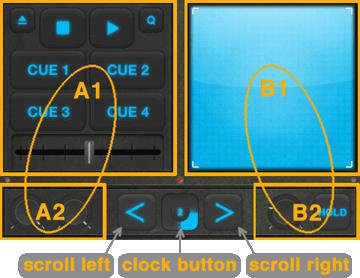
will generally see two modules at a time, that will cover the screen as
in this picture.
The first module occupies the areas named A1 and A2, while the second module
takes areas B1 and B2. The larger areas, A1 and B1, are the main views
of the modules while A2 and B2 are the control views.
The horizontal bar on the bottom of the screen is the dock. In the
center of it you have the clock button, that displays the playing beat and
gives access to multiple operations, such as creating new modules. The
arrow buttons beside it are to scroll the chain of modules. The areas A2 and B2
of the dock are contextual to the modules that you're currently seeing.
The main interface, shown in the picture above, contains three more elements called
peak indicators. They're small lights placed just above the dock that turn red when
high peaks in the audio are present. Tap here for more
informations about their use.
Type of modules
Modules are divided into three cathegories:
-
Audio sources. Objects that put the sound into the chain.
Depending on the module, the audio can be taken from a file, the microphone or
a recording for example.
A module of this cathegory takes the sound that comes from its left
(i.e. its input) and adds it to the audio source that it manages. Possibly, these two signals
can be mixed with different volumes with the help of some controls (e.g. knobs, crossfader).
-
Effects. Modules that change the sound in some extent, e.g. by adding
reverberation, filtering the high frequencies or reducing the digital quality to get
a low-fi distortion. All effects have the same XY pad interface, to control two
parameters with a single touch. Their control view usually include a hold button, to hold the cursor
on the pad, and a mix knob to control the amount of signal to be processed (0% to 100%).
-
Other. This cathegory include utilities, which can affect the music
(e.g. changing the tempo) or have other purposes (e.g. taking notes).
Manipulating the modules
To create a module, drag and drop the clock button onto one of the
drop buttons that will appear in the center of the screen.
Dependingly on the drop button that you choose you can place the new
module on the left slot, on the right slot, or in between. If the chosen slot is occupied by
another module, this will be replaced by the new one.
To remove a module, press and hold the clock button until the drop
buttons will change icon and have a red cross, then choose one.
If you have two visible modules in the screen, you can swap their
position by dragging one arrow button and dropping it onto the other
arrow button.
The chain of modules can be seen by two different points of view. The front view
is the interface that you will use most of the times as a performer,
and the back view (or settings view) is used to edit the behavior of the
modules or for other functionalities.
You can switch between the two views by double-tapping the clock button.
The set of modules in the chain forms a session, which can be saved to or load from file in the memory of your iDevice. These operations are available through the popup buttons, called respectively "Save" and "Load", appearing on the top of the screen when you press and hold the clock button. Just below these buttons, a label displays the name of the current session.
Sessions can sometimes be regarded as folders, containing audio files such as recordings and pasted clips.
A special session named "Autosaved session", located in the main documents folder, is overwritten
every time you quit Ricepad with a non-empty session running.
Another special session named "Current session", also located in the main documents folder, is created automatically every time you start working on a new unnamed session.